Shopping Master
A downloadable tool for Windows
ShoppingMaster
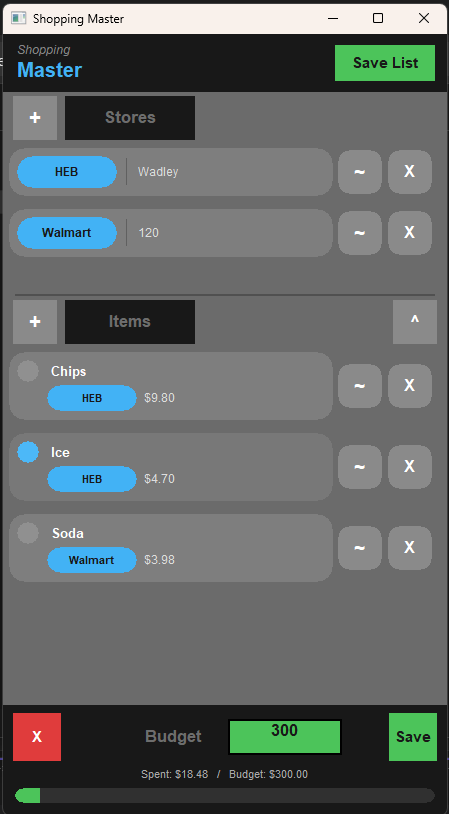
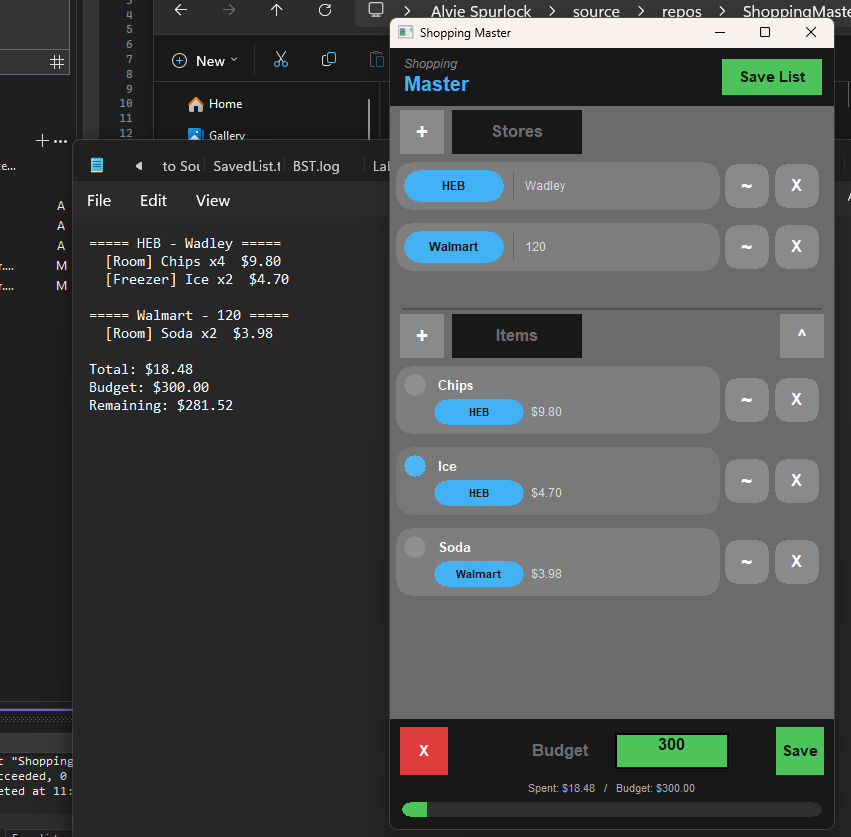
ShoppingMaster is a lightweight tool designed to help you build, organize, and optimize your shopping list with clarity and efficiency. It sorts your items by store and item name (both alphabetically), tracks each item’s temperature category, and ensures your groceries stay as fresh as possible by the time you get home.
Overview
ShoppingMaster focuses on simplicity and structure. Instead of juggling handwritten notes or messy phone lists, the tool guides you through adding stores and items, assigning temperatures, and printing a clean, organized list.
This makes ShoppingMaster ideal for:
- Weekly grocery runs
- Meal prep planning
- Budget‑conscious shoppers
- Anyone who wants a clean, optimized shopping workflow
Its design is intentionally minimal — no databases, no external libraries, no UI frameworks — just a clean, fast experience.
Why ShoppingMaster?
Most shopping lists become chaotic fast: items out of order, stores mixed together, cold items warming up in the cart, and no sense of priority. ShoppingMaster solves this by:
- Sorting stores alphabetically
- Sorting items alphabetically within each store
- Tracking item temperature (Room, Cold, Freezer)
- Keeping cold and frozen items grouped for freshness
- Providing a simple, repeatable workflow
- Allowing item replacement and list saving
Instead of manually reorganizing your list every time, ShoppingMaster handles the structure for you.
Core Features
Store & Item Management
- Store name
- Store address
- Item name
- Item count
- Item price
- Temperature category (Room, Cold, Freezer)
Temperature Tracking
Every item is assigned a temperature level:
- Room — shelf‑stable items
- Cold — refrigerated items
- Freezer — frozen goods
This helps you plan your route so cold items stay cold.
Alphabetical Sorting
ShoppingMaster automatically organizes your list:
- Stores sorted A → Z
- Items sorted A → Z within each store
This keeps your list predictable and easy to scan.
Replace & Update Items
- Modify existing entries without rebuilding your list from scratch.
- Save to File
- Export your final list to a text file for later use.
Clean Console Output
The tool prints your list in a structured, readable format:
Store==Place -- Item Name: Item -- Item Count: 1 -- Item Price: 1.99 -- Item Temp: Room
Example Workflow
----Options---- 1: Print List 2: Add Item 3: Replace Item 4: Save List Answer? 2 Item Store Name: Store Item Store Address: Place Item Item Name: Item Item Count: 1 Item Price: 1.99 Item Temp: 1: Room 2: Cold 3: Freezer *Give Number 1 -- Item Name: Item -- Item Count: 1 -- Item Price: 1.99 -- Item Temp: Room
Then printing the list:
Store==Place -- Item Name: Item -- Item Count: 1 -- Item Price: 1.99 -- Item Temp: Room
Summary
ShoppingMaster is a clean, minimal UI tool for building and optimizing your shopping list. With alphabetical sorting, temperature tracking, and simple item management, it keeps your groceries organized and your cold items fresh.
Purchase
In order to download this tool you must purchase it at or above the minimum price of $1 USD. You will get access to the following files:
Download demo
Leave a comment
Log in with itch.io to leave a comment.